Why Every Turo Host With a Tesla Needs FleetBold’s Dynamic Smart Key System

Managing a Tesla on Turo has always required one headache:
How do you give guests secure access to the vehicle without sharing your Tesla account or manually managing keys before and after every trip?
FleetBold just solved that forever.
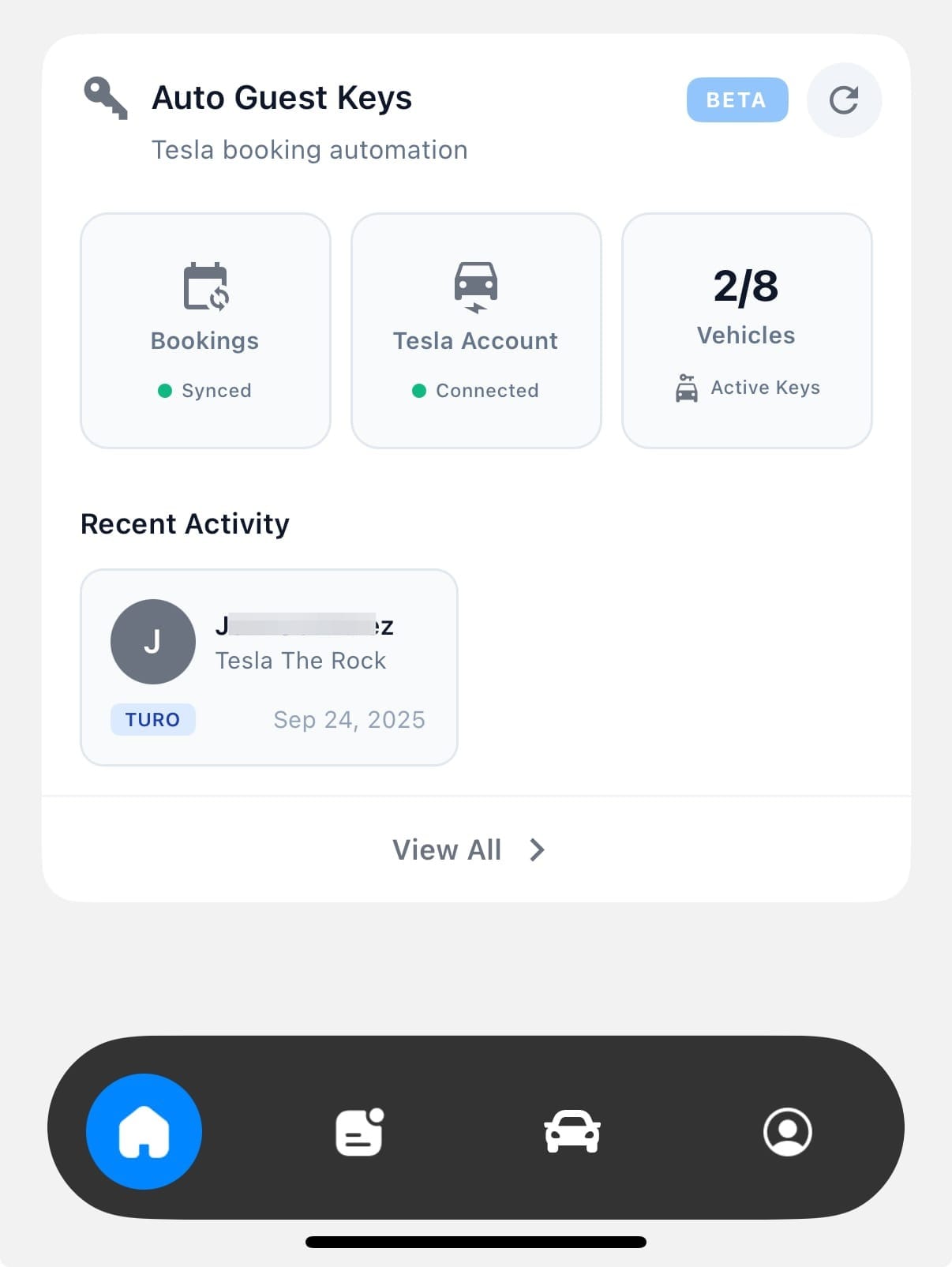
FleetBold has built the first dynamic Tesla Smart Key system designed specifically for Turo hosts.
This is not a workaround. Not a shortcut. And definitely not a key that you “manually create” inside the Tesla app.
This is the only system in the market where keys adjust automatically to the real booking period no manual edits, no revocation headaches, no guest access lingering after the trip ends.
How Turo Hosts Currently Create Tesla Keys (The Old, Painful Process)
Before FleetBold, creating a Tesla key for a Turo guest was a stressful, manual, and error-prone process. Here’s what a Turo host has to do today using the Tesla app alone:
1. Wait until the booking is confirmed at the exact moment it becomes active
You can’t create a key earlier because the guest might:
- change the trip time,
- shorten the booking,
- extend it,
- or cancel it entirely.
So hosts literally wait until the exact start time sometimes late at night after a long day just to generate the key.
2. Manually send a permanent-access link to the guest
Tesla’s native system does not support:
- expiration dates,
- automatic revocation,
- time-limited keys.
So the only option is sending the guest a “permanent driver” invitation.
That means the guest technically gets full access unless you remove it later.
3. Hope you remember to remove the key at checkout
At the end of the trip, hosts must manually log back into Tesla and revoke that key.
Here’s the problem:
- Hosts are busy
- Bookings overlap
- Schedules are tight
- Trips end at random times
And forgetting even once creates a massive security hole.
4. Old guests still keep access without the host knowing
This happens a lot:
- You forget to revoke the key
- A new guest arrives
- You send a new access invitation
- Now multiple guests still have access to the same Tesla
Worse: Teslas have a limited number of key slots, so leftover access eventually blocks new keys.
It’s messy, risky, and extremely inconvenient.
🚀 How It Works With FleetBold (The New Standard for Turo Hosts)
FleetBold eliminates the entire manual process.
Step 1: Open the booking even if it's 1 or 2 months in advance
It doesn’t matter if the trip is far away. FleetBold lets you generate the key early.
Step 2: Tap Generate Tesla Key
FleetBold creates a secure, dynamic key linked directly to the real booking window.
Step 3: Guest receives access + a countdown
The guest sees exactly when their key becomes active.
No confusion, no emails, no instructions needed.
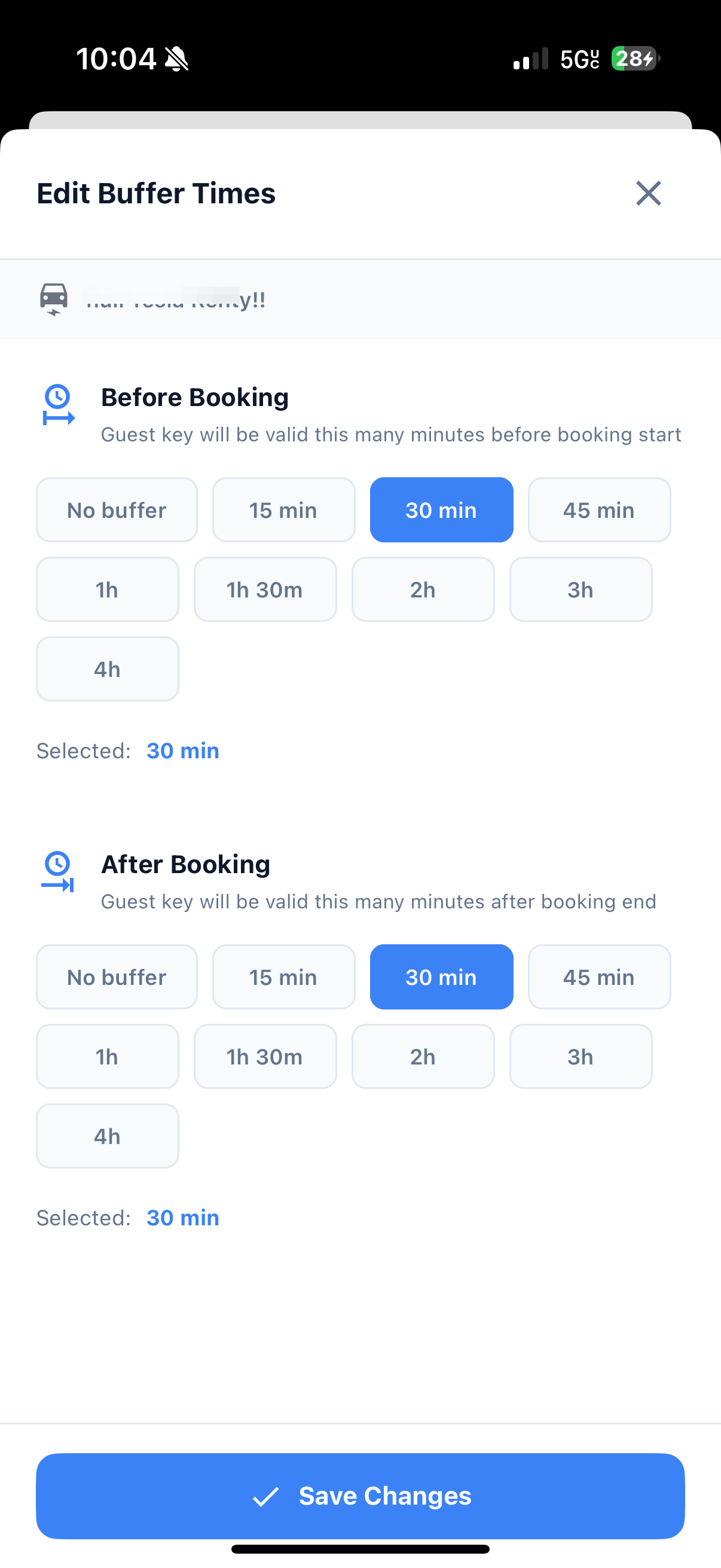
Step 4: The key works ONLY inside the trip window
If the trip changes:
- FleetBold shortens the key
- FleetBold extends the key
- FleetBold updates everything automatically
Step 5: The key deactivates by itself when the trip ends
No host intervention.
No leftover access.
No security gaps.
No old guests accidentally keeping access.
🧠 Bottom Line
The “old way” forces Turo hosts to become key managers, babysitting access at weird hours and hoping nothing goes wrong.
FleetBold turns the entire process into a fully automated, secure, booking-aware Tesla key system that works the same way every time clean, predictable, safe.
What Makes FleetBold’s Tesla Key System Unique?
FleetBold built a system that works with 99% of Teslas running an updated firmware.
If the car is up to date, FleetBold can generate the key.
The magic behind it isn’t just “key creation.”
It’s the dynamic access logic that happens behind the scenes.
How It Works (Technical, but simple enough to understand)
When a Turo host opens a booking inside FleetBold, the system generates a secure, time-bound digital token that acts as a Tesla key.
This token is tied directly to the exact start and end time of the booking.
FleetBold engineers built a pipeline that:
- Authenticates securely with Tesla’s backend
- Generates a unique encrypted access token
- Binds that token to the Turo booking metadata
- Monitors booking changes in real time
- Extends or shrinks access automatically
- Instantly revokes access the second the trip ends
Hosts don’t see the technical layers but everything behind it runs like a professional-grade access-control system built for high-volume Turo fleets.
It’s the closest thing to a real “smart lock” for Tesla vehicles, but designed specifically around the Turo booking lifecycle.
🔄 Dynamic Access: The Feature That Changes Everything
This is the #1 benefit and the reason FleetBold’s system is now the gold standard for Tesla hosts.
If Turo shortens the trip → the key automatically shortens.
If Turo extends the trip → the key automatically extends.
No manual steps.
No logging into Tesla.
No “oops, forgot to revoke the key.”
No leftover access after checkout.
Your Tesla only unlocks within the exact boundaries of the booking down to the minute.
🔐 Automatic Revocation = Real Security
Another problem for Tesla hosts:
When you use the Tesla app or Tesla Guest Access, you must manually revoke every key.
If you forget even once, the guest has access until you remove it.
FleetBold eliminates that risk completely:
- Access ends automatically
- No manual cleanup
- No leftover keys
- No security gaps
- No anxiety about “who still has access”
For Turo hosts, this is a huge upgrade in peace of mind.
🔍 Why FleetBold Is Better Than Tesla’s Native Guest Access
Tesla’s system was not built for Turo.
FleetBold’s system is.
Here’s the difference:
Tesla App / Guest Access
- Must manually create the key
- Must manually revoke the key
- No automated adjustments if the trip changes
- Easy to forget or leave keys active
- Not designed for high-volume turnover
- No integration with Turo’s booking lifecycle
FleetBold Dynamic Smart Key
- Generates keys inside the Turo booking
- Auto-adjusts to trip changes
- Auto-revokes
- No manual work
- Prevents leftover access
- Centralized in one dashboard
- Designed specifically for Turo hosts
The difference is massive.
🎯 Benefits That Matter for Turo Hosts
✔ Avoid sharing your Tesla account
✔ Key adjusts automatically to any trip change
✔ Zero manual revocation
✔ Full integration inside the FleetBold booking module
✔ Stronger security than native Tesla access
✔ Perfect for single-car hosts and large fleets
This is the kind of automation that serious Turo hosts need in order to scale.
🧩 How It Works Inside FleetBold (Simple Flow)
- Open your Tesla booking inside FleetBold
- Tap Generate Tesla Key
- FleetBold creates the dynamic token
- The guest receives access immediately
- Access always matches the booking window
- At checkout → key shuts off automatically
No extra steps.
No Tesla login.
No manual fixes.
🔮 Future Tesla Features Coming to FleetBold
(You can tease these without committing to dates)
- Advanced access logs
- Real-time restrictions
- Fleet control panel for multiple Teslas
- Enhanced guest monitoring inside the booking
- Additional safety rules tied to trip behavior
This system will keep evolving FleetBold is just getting started.
FAQ's
Does FleetBold work with all Tesla models?
It works with 99% of Teslas running current firmware: Model 3, Y, S, and X.
Do I need to manually revoke Tesla keys after each trip?
No. FleetBold revokes access automatically.
Does the key adjust if a guest extends or shortens a trip?
Yes. FleetBold automatically syncs with the real booking window.
Is this safer than using the Tesla app or Guest Access?
Yes because FleetBold eliminates leftover keys and automates revocation.
Do guests need the Tesla app?
No. FleetBold handles access directly.
Can hosts manage all Teslas in one dashboard?
Yes FleetBold centralizes access for all vehicles.
Conclusion
FleetBold didn’t just make Tesla access easier.
It reinvented how Turo hosts manage Tesla bookings.
With dynamic keys, automatic revocation, and booking-synchronized access, FleetBold now offers the most advanced Tesla key system in the world for Turo hosts.
If you manage Teslas on Turo, this is no longer a “nice to have.”
It’s the new standard.